
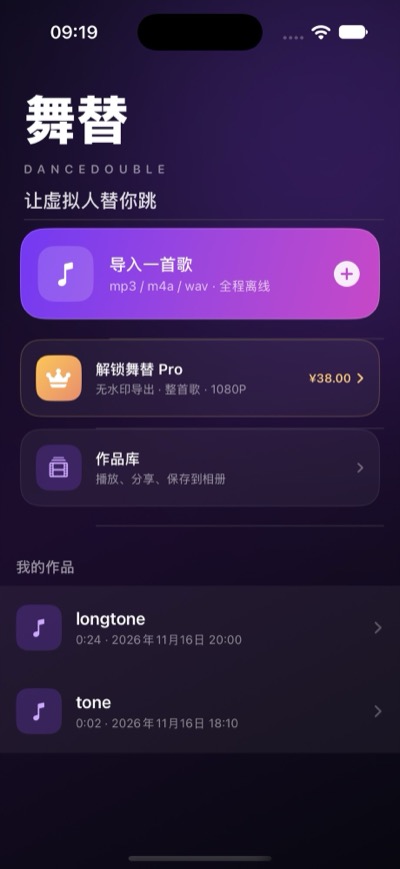
1. Import a song and it takes it from there.
Pick an mp3, m4a or wav from Files and DanceDouble copies it into its own sandbox, so reopening the project never asks for the file again. DRM-protected music, such as a download from Apple Music, cannot be analysed on the device; the app says so plainly instead of sending it anywhere for something else.
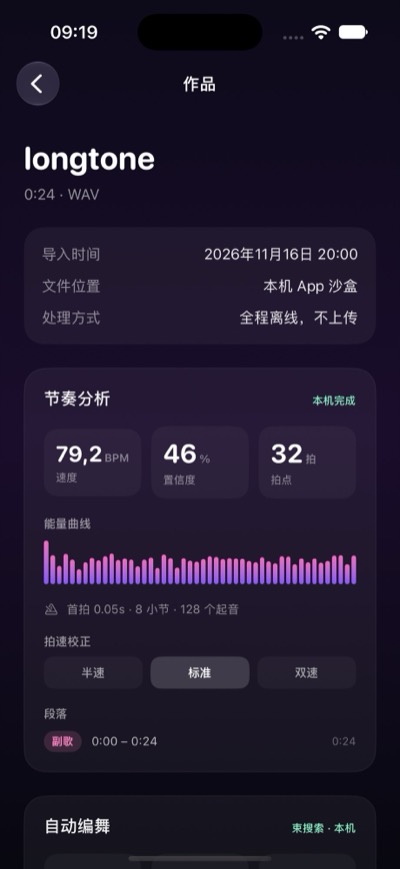
2. Tempo analysis stays on this iPhone.
Decoding, downmixing to 22050 Hz mono, spectral analysis and tempo and first-beat estimation all run locally and work offline. You get the BPM, first beat, bar count and sections; if the tempo was heard as double or half, the Half / Double buttons under Tempo correction fix it and the bars and choreography are re-planned together. When the rhythm is unclear it does not pretend to know — it falls back to a 120 BPM grid and tells you.
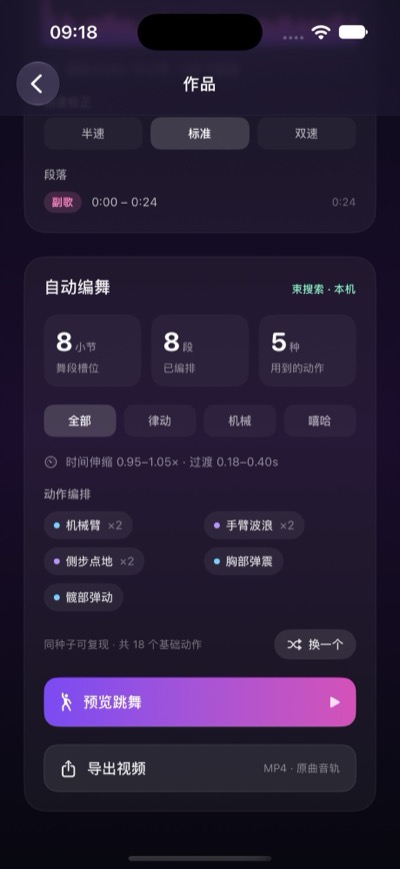
3. The choreography is searched, not spliced at random.
18 base moves fall into three groups — Groove, Pop and Hiphop — each tagged with the bar length, energy and sections it suits. DanceDouble runs a beam search bar by bar within each section, keeps several candidate arrangements, scores them for continuity and takes the best one. That is why transitions between bars do not jump and the moves land on the real beats. The chase lights around the stage platform derive from the same BPM, so the lights and the dancer hit together.
4. One song, many dances.
A dance is decided by the analysis plus a seed. The seed is stored with the project, so reopening gives the same dance; “Another one” changes the seed and produces a different arrangement that is just as on-beat. The style filter switches any time, so you can see what the same song looks like as Pop or Hiphop.
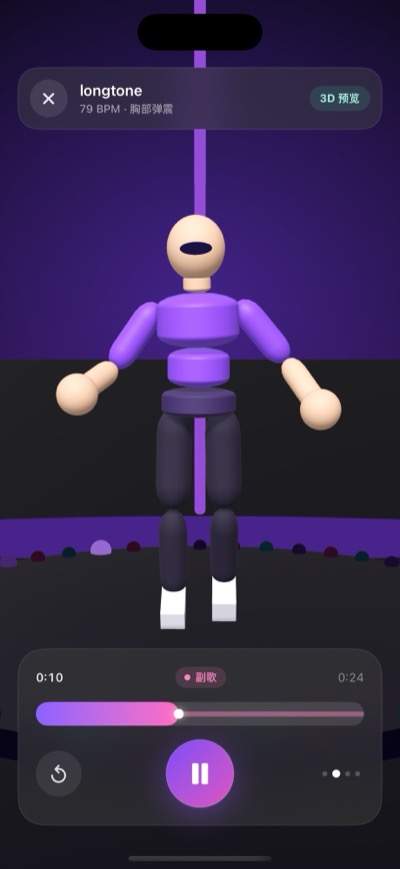
5. Watch it first on a 3D stage.
A neon stage, a round platform, three coloured follow spots and a ring of chase lights, with a portrait camera that leaves room for the whole body. The preview plays on the audio clock and shows the BPM and current move at the top; pause, replay or scrub. Export only once you like what you see.
6. What you export is a real video file.
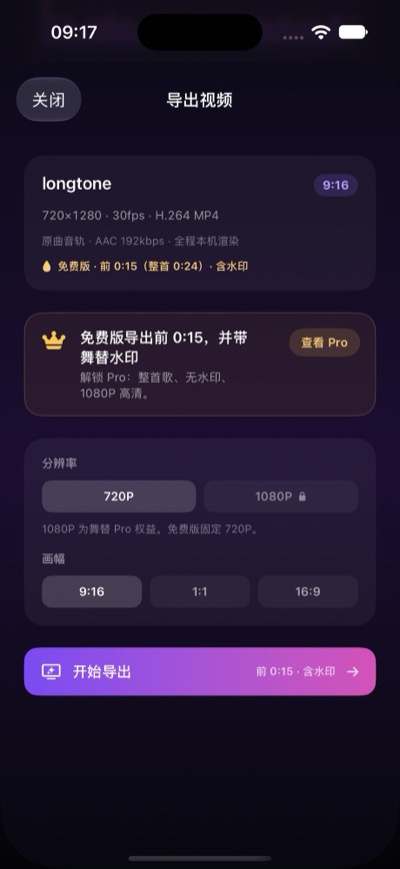
Frames are rendered off-screen and encoded directly: H.264 (High Profile) with AAC 44.1 kHz stereo, 30 fps, in an MP4 container; 9:16, 1:1 or 16:9, at 720P or 1080P. It does not record the screen, so the video matches the preview and is unaffected if you switch apps while it runs. You can cancel at any point and no half-written file is left behind.
7. Free is complete; Pro is one purchase.
The free version includes the full tempo analysis, the automatic choreography, the 3D preview, a 720P export (first 15 seconds, watermarked bottom right) and the Library, and you can keep using them indefinitely. DanceDouble Pro is a one-time purchase that unlocks exports of the whole song, removes the watermark and enables 1080P. Nothing renews; on a new phone or after reinstalling, use the same Apple Account and tap Restore Purchases.
8. No account, and no server of ours.
There is nothing to sign up for, and your songs, choreography and exported videos are never uploaded. There are no ads and no third-party analytics SDK. The only network traffic is Apple's in-app purchase (StoreKit 2), handled by Apple — we never see your order numbers or payment details. Photos uses the add-only permission: only when you tap Save to Photos is that one video written, and the app cannot read your library. Song copies, the project database and exported videos live in the app's sandbox; deleting a project or the app deletes them.

Free to download: importing, analysis, choreography, the 3D preview, a 720P export and the Library are all free. DanceDouble Pro is a single one-time purchase that never expires and never renews; the price shown on the App Store page is the price.
Analyse / choreograph / preview / export — every step from a file to an MP4, in one app.
Three aspects: 9:16 for short video, 1:1 for square posts, 16:9 for landscape — the same dance, no re-choreographing.
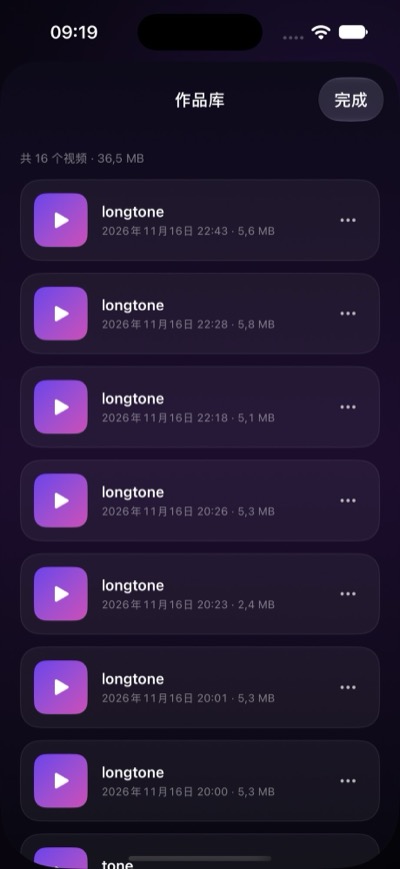
Library: every exported video, newest first, with the count and total size; play full screen, share, save to Photos or delete.
Language: Simplified Chinese interface.
Appearance: a dark stage interface, matching the 3D scene.
Requirements: iPhone, iOS 18 or later, portrait orientation.
 |
 |
 |
 |
 |
 |
Usage notes and FAQ: DanceDouble support
Privacy policy: DanceDouble privacy policy
Email: zhsoft88@icloud.com